
Spectrum routers include a built-in firewall (Security Shield) that can block 2.4 GHz IoT devices like the Flame Boss or Egg Genius from connecting. There is a one-time workaround available using the Spectrum mobile app or your online account.
Spectrum Users – Try the following:
Steps:
- Open the Spectrum mobile app or log into your account
- Go to Manage Internet / WiFi
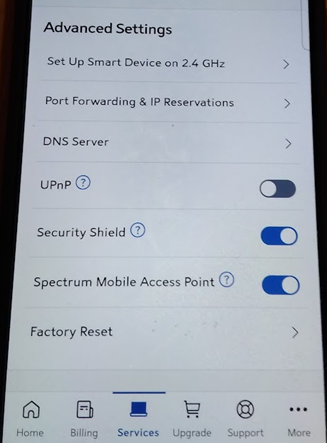
- Scroll down to Network Equipment (modem/router) and select your router
- Scroll to Advanced Settings
- Toggle Security Shield OFF
- Plug in your Flame Boss / Egg Genius and watch for the LED to go from fast blinking to solid
- Once connected, return to the Spectrum app and toggle Security Shield back ON
Please let us know if any of these steps do not work.
If your controller still does not connect after selecting your WiFi network during setup, it is usually due to:
- An incorrect WiFi password, or
- Network security settings being too high
In that case, we recommend contacting your internet service provider to:
- Confirm the 2.4 GHz network is enabled
- Verify the WiFi password
- Lower the security settings if needed to allow the device to connect
If further assistance is needed please reach out to us at 1-800-978-9078. We are available Monday through Friday from 9 AM to 6 PM EST.